The header controls
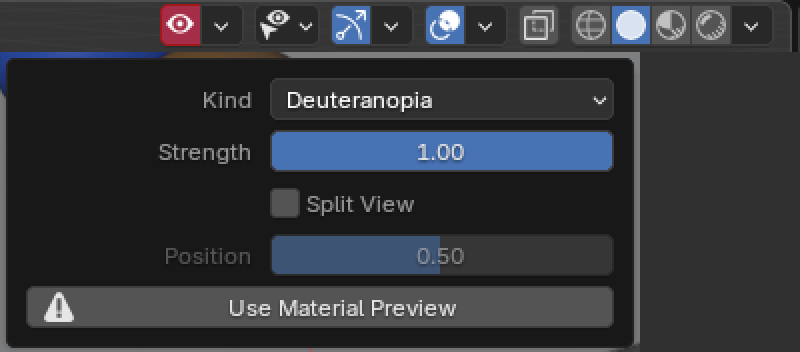
The eye button and a small arrow beside it sit in the 3D Viewport header, to the left of Selectability & Visibility, next to the Gizmos and Overlays buttons. The eye turns the simulation on and off. The arrow opens a panel with the settings.

| Control | What it does |
|---|---|
| Eye button | Turns the simulation on and off. Shortcut: Shift+Alt+C. It turns red when the simulation is on but this viewport cannot show it. |
| Kind | Deuteranopia (red-green, the most common kind), Protanopia (red-green), Tritanopia (blue-yellow), Achromatopsia (no colour, only brightness). |
| Strength | How much of the colour vision is gone. 1 is full, lower values show a milder form. |
| Split View | The picture as it is on the left, the simulation on the right. |
| Position | Moves the line between the two halves. Used while Split View is on. |
Good to know
Section titled “Good to know”- The simulation shows only in Material Preview and Rendered. In Solid and Wireframe the eye turns red, and the panel has a button, Use Material Preview. DaltonPilot never changes your shading mode unless you click it.
- Undo and Redo step through your changes to the simulation like any other change.